The Real Cost of Manual Documentation
Creating documentation manually is extremely time-consuming. Studies show that knowledge workers spend up to 50% of their time creating and managing documents. Employees also waste an average of 2 hours per day just searching for information.
Every software update, new feature, or process change requires rewriting guides. This leads to outdated documents, user confusion, and lost productivity. xCroScribe solves this by capturing real workflows as they happen and turning them into accurate, up-to-date documentation instantly.
How xCroScribe Works – Step by Step
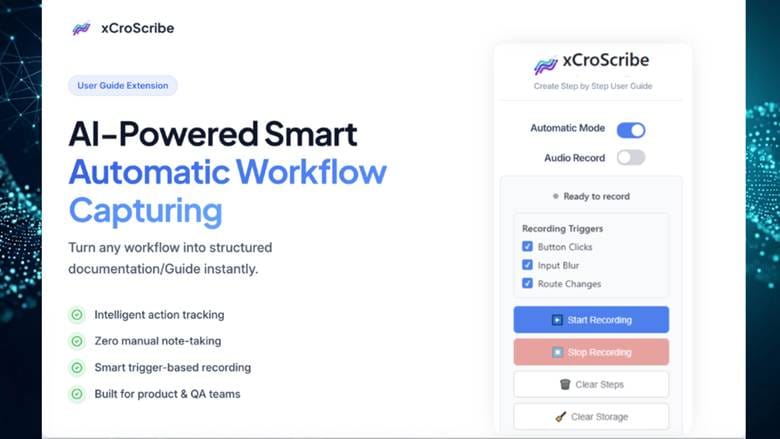
- Record Naturally – Start recording while using any web-based software. Speak as you go.
- AI Processes Everything – The tool transcribes voice, detects steps, captures screenshots, and understands context.
- Instant Guide Generation – Get a complete professional manual with numbered steps, annotated images, and auto-generated TOC.
- Export & Share – One-click PDF export, ready for your team, clients, or knowledge base.
The entire process takes minutes instead of hours.
See xCroScribe in action → Install xCroScribe from Chrome Web Store
Who Benefits Most from xCroScribe?

- SaaS Product Teams Create feature guides and onboarding flows faster than ever. Explore xCroTek AI Solutions
- CRM & Software Implementation Document complex setups for Salesforce, HubSpot, Odoo, and more with ease.
- Customer Success & Training Build self-service knowledge bases that improve adoption rates.
- Internal Process Documentation Standardise HR, IT, finance, and operations workflows while preserving institutional knowledge.
- Consultants & Agencies Deliver premium documentation as part of your client deliverables.
Key Benefits of xCroScribe
- Dramatic Time Savings – Reduce documentation time by up to 70%.
- Consistent Professional Quality – Every guide looks polished and on-brand.
- Higher User Adoption – Visual, step-by-step guides help users succeed faster.
- Cost Efficiency – Less need for dedicated technical writers.
- Knowledge Retention – Capture expertise before it leaves the organisation.
xCroScribe vs Other Tools:
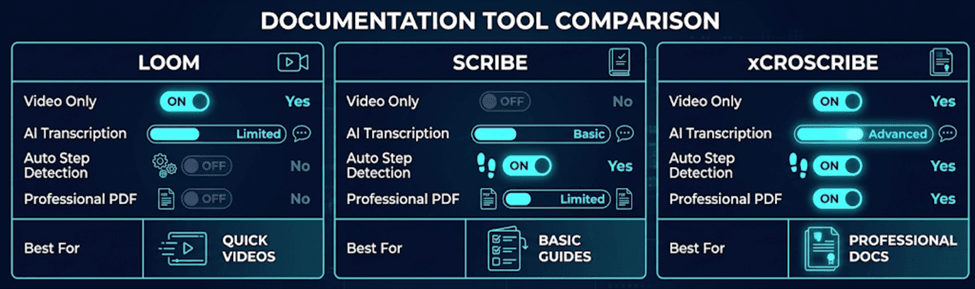
xCroScribe stands out by delivering production-ready documentation, not just quick captures.
The Bigger Picture: AI-Powered Productivity
xCroScribe is part of xCroTek’s growing suite of intelligent tools designed for modern enterprises. The company specialises in Agentic AI, automation, and digital transformation solutions.
By automating repetitive documentation tasks, teams can focus on high-value work — innovation, customer relationships, and growth.
How to Get Started
- Visit the Chrome Web Store and install xCroScribe.
- Record your first workflow.
- Generate and export your first professional guide.
Conclusion
Manual documentation belongs to the past. With xCroScribe, you can capture workflows once and instantly create professional user guides, training materials, and process documents.
Whether you’re a growing startup or an established enterprise, this tool will save your team countless hours while dramatically improving documentation quality.
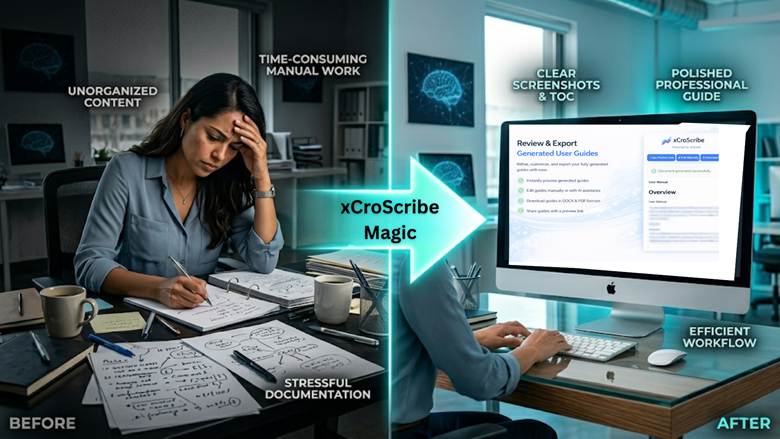
Stop writing manuals. Start recording them. Ready to transform how your team documents knowledge? Try xCroScribe today and experience the future of AI documentation.
FAQ’s
How can I create user documentation faster?
xCroScribe automatically converts screen recordings into professional step-by-step guides, reducing documentation time drastically.
What is the best AI tool for creating SOPs and training manuals?
xCroScribe helps businesses generate SOPs, onboarding documents, and training manuals automatically using AI.
How do I turn a screen recording into a written guide?
With xCroScribe, you simply record your workflow with voice narration, and the AI generates a structured written guide with screenshots and steps.
How can I document software workflows without hiring a technical writer?
xCroScribe automates the entire documentation process, helping teams create professional guides without dedicated technical writing resources.
What is the easiest way to create onboarding and help documentation for SaaS products?
xCroScribe makes it easy to create visual onboarding guides, help articles, and customer training documentation in minutes using AI.